What changed for ChatGPT Pro users
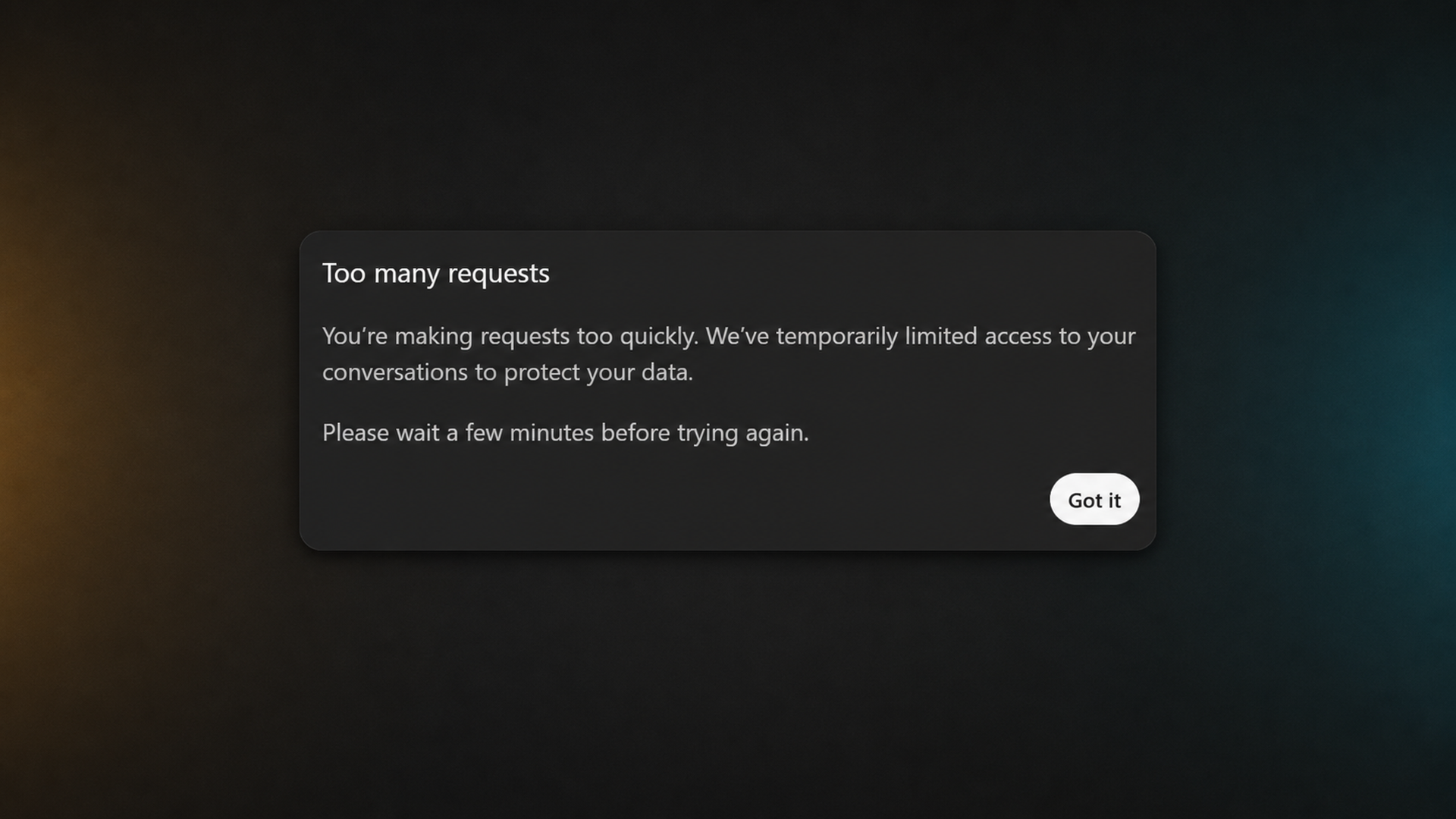
Jivaro documented the restriction in a paid ChatGPT Pro session on August 18, 2026. Four requests submitted within a short period were followed by a modal titled “Too many requests.” The message said the user was making requests too quickly, that access to conversations had been temporarily limited “to protect your data,” and that the user should wait a few minutes before trying again.
This is more disruptive than a warning attached to one model or one failed response. The wording says access to conversations is temporarily limited, which can interrupt an active workflow across the product. The popup provides no numerical limit, countdown, reset time, or explanation of which activity triggered the control.
A four-prompt burst triggered a temporary conversation-access restriction in the documented Pro session. OpenAI has not established publicly that every account has the same threshold.
Why this qualifies as a silent update
OpenAI’s current ChatGPT release notes contain product launches, model changes, feature availability, and some plan-limit information. When checked on August 18, they did not contain a notice describing this rapid-request control, a four-prompt trigger, or a new conversation-wide restriction for Pro users.
OpenAI’s Pro documentation does leave room for temporary restrictions. It says guardrails intended to prevent misuse can occasionally limit usage and that ChatGPT will notify the user. That general disclosure does not tell subscribers how quickly the control activates, whether ordinary manual prompting can trigger it, or how long access will remain unavailable.
Calling the change silent does not mean OpenAI has never disclosed the existence of guardrails. It means the newly observed behavior and its practical threshold were not explained in the company’s product changelog or plan documentation at the time of publication.
This is not the same as reaching a model allowance
OpenAI documents separate allowances for some models on ChatGPT Pro. When a user reaches one of those allowances, the affected model may become unavailable until its allowance resets, while another model may remain usable. The rapid-request popup describes a different condition: requests are being sent too quickly and access to conversations is temporarily limited.
| Limit type | What the user sees | Practical effect |
|---|---|---|
| Model allowance | A model becomes temporarily unavailable, sometimes with a reset time. | The user may be able to choose another available model. |
| Rapid-request restriction | A “Too many requests” popup says requests were made too quickly. | Conversation access is temporarily limited, with no visible countdown in the captured message. |
The distinction matters for subscribers. A plan can offer high or “unlimited” model access subject to guardrails while still applying short-window controls that stop an otherwise ordinary session.
Why four rapid prompts is a severe threshold
Four prompts is not an extreme workload for a human user. It can occur while correcting a misunderstood instruction, splitting a task into steps, checking several files, or continuing a fast back-and-forth exchange. A threshold this sensitive can make normal iterative work look like automation, particularly for experienced users who prepare prompts before submitting them.
The product impact is larger for Pro subscribers because the plan is marketed toward people doing frequent, demanding work. A temporary pause may be minor during casual use, but it can break concentration during coding, research, writing, or incident-response work. The lack of a visible reset time also prevents users from knowing whether to wait, switch tools, or contact support.
It is the trigger observed in this documented case. The control may also consider timing, account history, concurrent activity, client behavior, or risk signals that the popup does not reveal.
What remains unknown
OpenAI has not publicly answered several questions needed to assess the restriction fairly:
- How short is the request-counting window?
- Does the threshold differ between the $100 and $200 Pro tiers?
- Is the behavior global or part of a staged experiment?
- Does it apply per conversation, device, account, or network?
- Can concurrent tabs, retries, background features, or connected tools contribute?
- How long does the restriction normally last?
- What activity makes the system classify a burst as a data-protection risk?
- How can a user distinguish a normal rate control from an account-security event?
Without those details, users cannot tell whether the popup reflects a stable product limit, a false positive, a security response, or a temporary rollout configuration.
What affected users can do
- Stop retrying immediately. Follow the popup’s instruction and wait several minutes. Repeated attempts can make rate-based systems harder to clear.
- Record the conditions. Note the plan, model, time, device, number of open sessions, and approximate spacing between prompts.
- Preserve unsent work. Copy drafted prompts into a local document before refreshing or signing out.
- Check whether access returns normally. If it does not, contact OpenAI Support and include the screenshot and timing information.
- Avoid assuming misconduct. The popup is a product control, not proof that OpenAI found a policy violation.
Users should not attempt to evade legitimate safety or security controls. The immediate issue is transparency: paid subscribers need enough information to understand normal use boundaries and identify mistakes.
What OpenAI should publish
OpenAI does not need to reveal every anti-abuse signal. It can still publish useful operating guidance: an approximate burst limit, typical reset range, the scope of the temporary block, factors that may create false positives, and the support path for repeated restrictions.
The company should also distinguish data-protection restrictions from model allowances and policy-enforcement actions in both the interface and documentation. Those events have different causes and consequences, but the current popup gives the user only a generic wait instruction.
For Pro plans in particular, product pages should explain how high usage allowances interact with rapid-request throttles. “Higher limits” is not enough information if a short burst of ordinary manual prompts can temporarily close access to conversations.
The bottom line
A newly observed ChatGPT control can temporarily stop a Pro user from accessing conversations after four prompts sent in quick succession. Jivaro confirmed that behavior in one documented session and preserved the popup as evidence.
What is not yet confirmed is whether four prompts is the universal threshold or how broadly the control has rolled out. OpenAI’s own documentation acknowledges temporary guardrail restrictions but does not disclose this trigger in its current release notes. Until the company explains the rule, Pro users are left with a severe practical limit and very little information about when it will activate.
Frequently asked questions
No matching four-request threshold appeared in OpenAI’s ChatGPT release notes when Jivaro checked on August 18, 2026. The observed restriction was confirmed in a Pro session, but OpenAI has not published its timing window or rollout scope.
Not necessarily. The popup says requests were sent too quickly and temporarily limits access to conversations. That differs from OpenAI’s documented model-allowance behavior, which can make one model unavailable until its allowance resets.
Wait several minutes before retrying, as the popup instructs. Repeated immediate attempts may extend or retrigger rate-based controls. Contact OpenAI Support if normal access does not return or the restriction appears incorrect.
That has not been established. Four rapid prompts triggered the documented case, but OpenAI has not said whether the threshold is universal, account-specific, risk-based, regional, or part of a staged rollout.
Sources and references
- Jivaro test capture: ChatGPT “Too many requests” restrictionJivaro · first-party
- About ChatGPT Pro tiersOpenAI · primary
- ChatGPT — Release NotesOpenAI · primary