

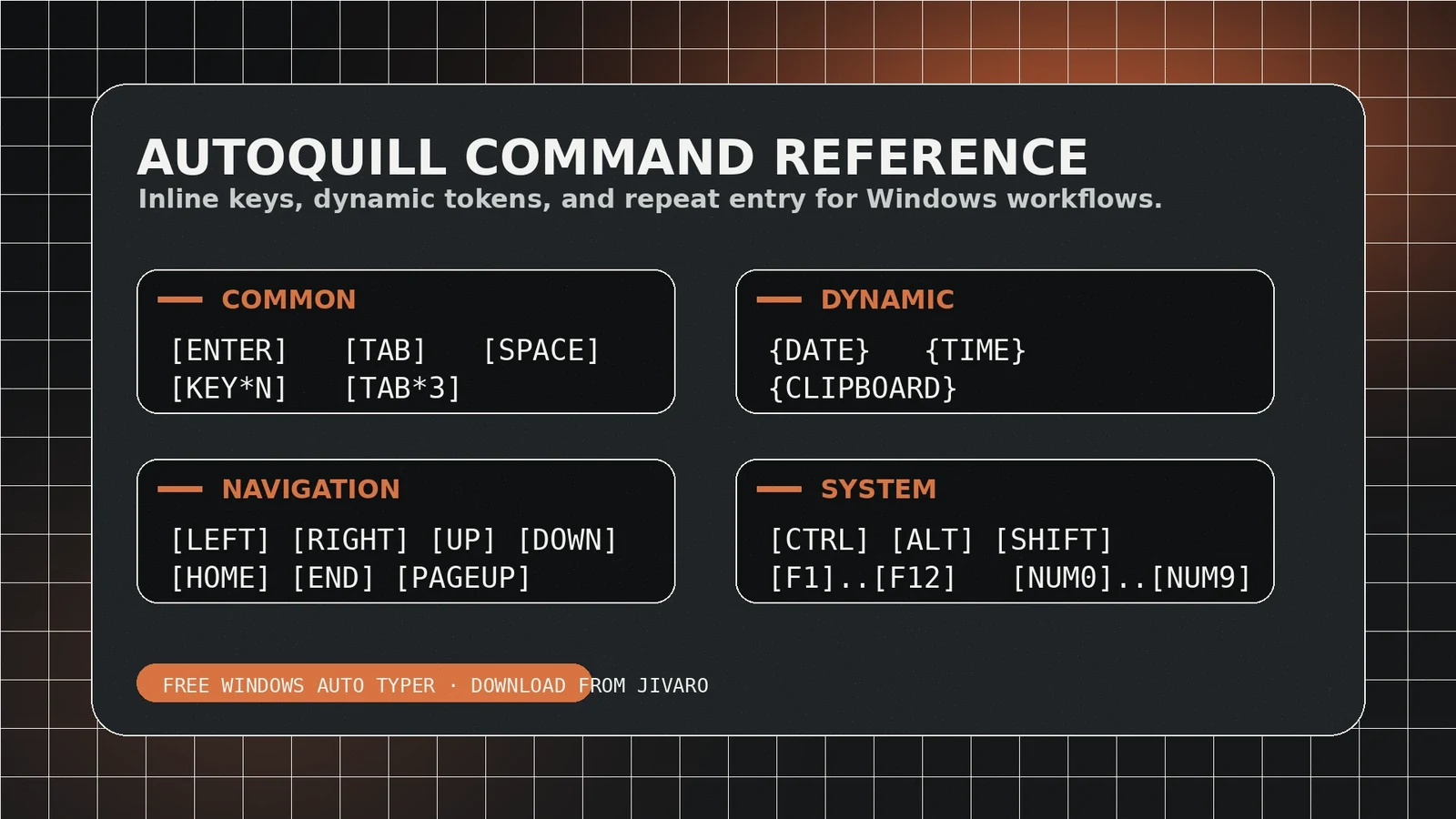
Use this reference before running a long script
AutoQuill sends text and keyboard actions to the window that currently has focus. That makes it useful for repetitive typing, demonstrations, controlled data entry, and application testing, but it also means a correct script can do the wrong thing if focus moves. Build scripts in small blocks, verify the destination, and keep a stop control ready.
Think in four kinds of instruction
| Type | Purpose | Example use |
|---|---|---|
| Literal text | Types the characters you wrote. | A paragraph, template, or repeated response. |
| Special key | Sends a key that is not ordinary text. | Enter, Tab, Escape, arrow keys, or a function key. |
| Timing control | Waits before the next action. | Allow a page, dialog, or autocomplete list to settle. |
| Sequence control | Repeats or groups a known block. | Run the same tested step several times. |
Keep literal text visually separate from commands. If a token can also appear in the content you need to type, test how AutoQuill escapes it rather than assuming it will remain literal.
Command and token workflow
- Write the literal text first and save a copy outside AutoQuill.
- Add special keys only where the destination requires them.
- Insert a short pause after navigation, submission, window changes, or any action that triggers loading.
- Test one pass. Check whitespace, capitalization, punctuation, and field order.
- Add repeats only after the single pass succeeds several times.
Use the command reference shown inside your installed AutoQuill version as the syntax authority. Features can change between releases; do not copy an old token from a screenshot without confirming it in the current build.
Hotkeys need an emergency hierarchy
Choose start, pause, resume, and stop controls that do not conflict with the destination application. The stop control matters most: it should be easy to reach and should not depend on typing into the active field. Avoid shortcuts already used by browsers, editors, remote-desktop tools, accessibility software, or the target application.
- Start: begin only after focus is confirmed.
- Pause: suspend the sequence without losing the remaining steps.
- Resume: continue only after checking the cursor position.
- Stop: terminate immediately when the target changes or output diverges.
Common failure patterns
| Symptom | Likely cause | Correction |
|---|---|---|
| Missing characters | The destination cannot process the selected speed. | Reduce WPM and retest with the same sample. |
| Text in the wrong field | Focus changed or Tab order differed. | Add a checkpoint; avoid blind navigation across dynamic forms. |
| Commands typed literally | Syntax is invalid for the installed version. | Use the in-app reference and validate delimiters. |
| Actions happen too early | A fixed pause is shorter than real loading time. | Increase the delay or use a manual checkpoint. |
For deeper diagnosis, use the AutoQuill troubleshooting guide. For run-time planning, see the WPM and pause guide.
Pre-run checklist
- Confirm the current AutoQuill version and syntax.
- Use a non-sensitive test document.
- Check the keyboard layout and input language.
- Close overlays that can steal focus.
- Disable repeats for the first run.
- Verify pause, resume, and stop controls.
- Keep an untouched copy of the source text.
Command accuracy comes from controlled testing, not from making the script more complicated. A short, explicit sequence is easier to inspect and recover than a long run that assumes every window will behave identically.
Frequently asked questions
Start in an empty text editor, use a short sample, keep an emergency stop key ready, and confirm every pause, repeat, and special key before using the script in a real form or application.
Use separate, clearly labeled steps whenever possible. It makes pauses and repeated actions easier to audit and reduces the chance of editing a token accidentally.
It works by sending keyboard input to the focused window, but individual applications can handle simulated input differently. Test the exact destination and avoid sensitive or irreversible forms.
Sources and references
- AutoQuill product pageJivaro · first-party · Accessed 2026-08-20
- AutoQuill v0.13 release notesJivaro · first-party · Accessed 2026-08-20